
Showing posts with label Excel. Show all posts
Showing posts with label Excel. Show all posts
Tuesday, May 27, 2014
Paste Picture Link in Excel
Sheet 1 : Highlight / Copy / ( from Clipboard group )
Sheet 2 : Paste Picture Link ( from Clipboard group / paste / as picture / paste picture link
** any correction s/b on sheet 1, and automically change on sheet 2 **

TODAY, MONTH, YEAR IN WORD & EXCEL
Today / Month / Year
Today / Month / Year :
1,
= TODAY()
2,
=MONTH(TODAY())
3,
=YEAR(TODAY())

222222222222222
Word : Insert / Date & Time / Check "Update automatically"
To create Drop-down List in Excel


22222222222222222 ( if space not find : to HTML TYPE 22222 on the end of <>

Tuesday, May 20, 2014

Number 0 from starting in Excel
1. Starting from 0 : Use ' Type number
2. Office Butter : Excel Option / Formulas / Uncheck " Numbers formatted as text...."


2. Office Butter : Excel Option / Formulas / Uncheck " Numbers formatted as text...."
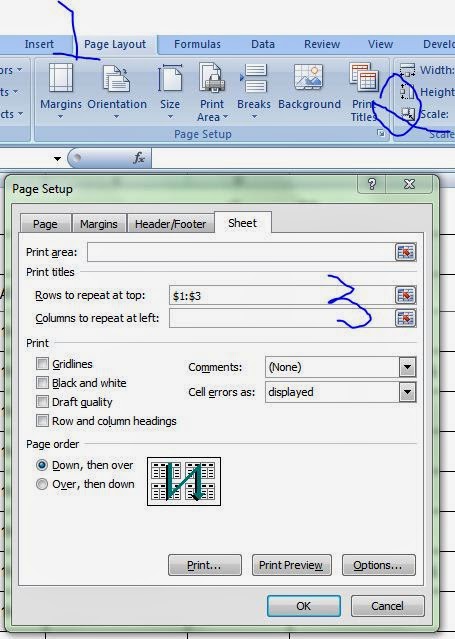
Print Title in Excel
1. Page Layout / Print Titles / Sheet / Rows to repeat at top / Highlight Title / Print Review / Next Page


Duplicate in Excel
Original File
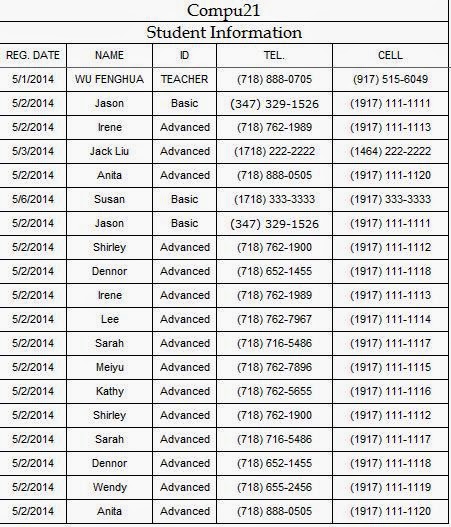
1. Home / Conditional Formatting / Highlight Cells Rules / Duplicate values / OK ( ** not highlight Title **)

2. Highlight Cells / Data / Remove Duplicate / OK (**** not highlight Title ****)

1. Home / Conditional Formatting / Highlight Cells Rules / Duplicate values / OK ( ** not highlight Title **)
2. Highlight Cells / Data / Remove Duplicate / OK (**** not highlight Title ****)
Tuesday, May 13, 2014


Tuesday, May 6, 2014
Form (Data List) in Excel
Quick Access Toolbar / More Commands / Commands Not in the Ribbon / Form / Add / OK
1. Highlight Menu / Form
- insert information
- click new
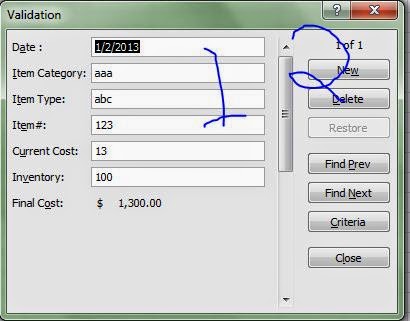

1. Highlight Menu / Form
- insert information
- click new


Tuesday, April 29, 2014
Filter in Excel
- Highlight/Data/Filter
- Symbol/(clear) select all/INTC
- Highlight/Type/Ctrl+Enter
- Symbol/Select All

Tuesday, April 22, 2014

Tuesday, April 8, 2014


Lock - Protect Sheet
Lock - Protect Sheet
1, Select Cells / Right Click / Format Cells

2, Review / Protect Sheet

2, Review / Protect Sheet

Tuesday, April 1, 2014

Tuesday, March 18, 2014

Tuesday, March 11, 2014


Subscribe to:
Posts (Atom)